Powered by Blogger.

Latest Post

Google Voice is broken in Android 4.2

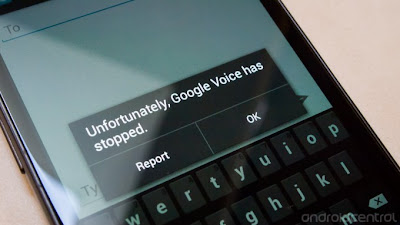
We're hearing lots of rumblings about Google Voice issues with Android 4.2, starting with the early Nexus 4 review units that went out, but that could've been blamed on pre-release software. Well it seems that the final 4.2 software has the same bits that make the Google Voice app crash as well. Going to the Google Voice app, hitting the button to create a new message and attempting to add a recipient causes a complete force close of the app -- every single time.
google voice

Now, this is likely an issue in Google Voice itself, which if we had to choose would be the preferred place to find the error simply because it can be updated quickly in the Play Store. Its still unfortunate to see an update completely break one of Google's own first-party apps. Hopefully the fix is coming soon. In the meantime, if you're a heavy Google Voice user you may want to hold off on that 4.2 update for your Galaxy Nexus.

Source: Android central.com

Nexus 10 Could Revitalize Android Tablet Apps

Now that Google's Nexus 10 tablet is in the marketplace, the next big question is whether it can get the app support it needs to build broad popularity. And there is reason to think it will. Sales of Android tablets are taking off, and app developers are starting to take notice. Strength on the app side, in turn, could make Android tablets a broad-spectrum alternative to Apple's iPad.

Likewise, for the IT community at midsize firms, this could make Android tablets a more attractive option. A large consumer base strengthens the Android argument, both for reaching customers and for bring-your-own-device (BYOD) users. Even company-issued tablets could end up in the picture.

It is All About Software


Nexus tablets, both 7-inch and 10-inch versions, have been drawing some of the most positive reviews of any Android tablets. They can take it to the iPad with both processor horsepower and a high-resolution display. The lurking question about Nexus, and Android tablets in general, has been a shortage of apps that make full use of their power.

But as Casey Newton reports at CNET , this may be poised to change. For one thing, Android tablets are hitting their stride. Last quarter, for example, Apple slipped to barely over half of the tablet market, which means that Android tablets are catching up.

Google is doing its best to encourage the trend. One reason for its substantial Nexus 10 development effort, says Hugo Barra, head of Android project development, was precisely to grab the attention of the app development community.

And the developers are responding. One development shop, Squrl, previously held off on Android. But after last June's Google I/O developer conference, Squrl changed its tune. It is now actively developing Android apps. Game developers such as EA and Gameloft are also signing on. Games may not factor into the BYOD picture, but they are a powerful draw for high-end tablet buyers.

Realizing the Potential


From the perspective of IT managers at midsize firms, Android has some real advantages - at least in principle. It is free of Apple's tight control. And because it is open source it can be tweaked and configured to meet a firm's specific needs. Even security , a major Android issue, can benefit from open source flexibility.

Also, from a different angle, while IT might like Windows RT, no one knows yet whether Windows tablets will become more than a niche item.

The potential strengths of Android also depend on broad and lasting user support. Thus the IT community at midsize firms will be watching closely to see whether app developers continue to respond to Android and provide it with a rich app ecosystem.

Source

Samsung Galaxy S3 Jelly Bean Update Might Launch Soon on AT&T

It may not be Android 4.2, but an update from Android 4.0 Ice Cream Sandwich to Android 4.1 Jelly Bean may be rolled out this week for the AT&T Samsung Galaxy S3. This was reported by colorful tech site PopHerald , which had received a tip from an unnamed insider, apparently one close to the carrier.

That would leave Verizon Wireless customers without a Jelly Bean update for its Galaxy S3 users. Verizon has not had a very good history of rolling out updates in a timely manner, so there remains the chance of “Big Red” being one of the last, if not the last carriers to roll out Android 4.1 for the Galaxy S3.

Aside from AT&T and Verizon, Sprint, T-Mobile and U.S. Cellular also offer the Galaxy S3. Sprint had rolled out its Jelly Bean update some time ago, making it the first carrier to get its Galaxy S3 users upgraded to the second-newest Android platform. T-Mobile and U.S. Cellular haven’t made any announcements yet on their Jelly Bean update schedules.

Android 4.1 Jelly Bean is arguably best known for introducing users to Project Butter and Google Now. Google Now is the search engine giant’s “answer” to Siri, a virtual assistant of sorts that provides directions and traffic updates, among others.

Project Butter is Google’s term for the much smoother user interface interactions experienced on Android 4.1-powered devices. So far, Jelly Bean updates for the Galaxy S3 have been successfully rolled out in several markets, mostly located in Europe, Southeast Asia and the Middle East.

Source

Why is Android Vulnerable?

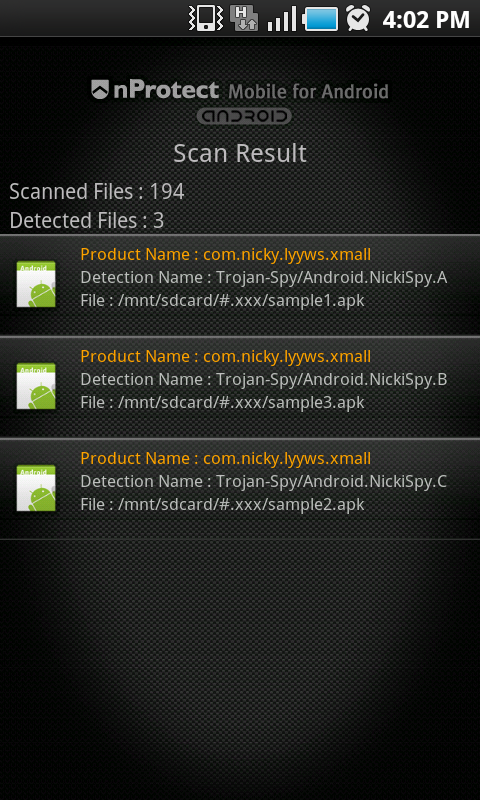
The ability for users to load software ‘off market’ opens the door for malicious applications to be distributed without the need for a vulnerability:’ says Wisniewski, meaning anyone can write an app and anyone can install anything on their Android phone. granting it permission to go wild with their personal data. Symantec reports that a maximum of 49 devices were infected with the Android.Nickispy trojan .

Google’s main defence is the Android Permissions notifier, which tells you exactly which phone features an app will be able to access once installed. The problem is, no one reads these permissions. It’s a boring list of things most of us don’t understand. How is the everyday man expected to know whether it’s right or wrong for a particular app to require access to his contacts details?

There is also the problem of software updates, which has been the bane of Android over the last year or two, as Google relentlessly releases new OS versions and the networks struggle to keep up.

“The other factor that increases the risk for Android users is the lack of patches that fix the vulnerabilities that are discovered:’ explains Wisniewski. “Even if Google fixes the flaws in the core version of Android, most carriers and phone makers lag far behind integrating the fixes, if they bother at all.”

Which all sounds very worrying, but then again it’s common practice, and advice throughout the tech world is to always update to the latest version of any software. If you have been stranded with an unsupported Android model that’s sitting on version 1.6 of the operating system, you may well be more vulnerable because the hackers have had longer to work on exploits.

Source

Samsung might be developing a Google Glass competitor, lets you control devices using your thoughts

Comic book and movie fans have probably dreamed of becoming Professor X – without the wheelchair restriction – at one point in time, if only to get a taste of the mutant leader’s ability to control people and objects with his mind.

It seems tech companies have been listening to our childhood fantasies and are developing technology that will enable us to tap into the power of our brain – albeit not at the same out-of-this-world level. But it’s a start!

Patent Bolt has spotted several Samsung patent applications that will provide ways for users to control their electronic devices by using their minds, with the help of a neural activity detector. The technology that Samsung is developing will be able to detect neural activities — such as EEG, EOG, and EMG – and translate those thoughts into actions. This makes for a hands-free operation of a computing device.

Here’s what the rest of the description says: “The electrical signals representative of the neural activity are transmitted via wired or wireless to the control unit. If a predetermined signal is sensed by a detecting device, the same EEG readings may be monitored.” Once the signal hits the system, the control unit will then perform the intended action, allowing users to “open file”, “close file”, “clicking”, “paste”, “delete”, and others.

The other patent application is for a mini projector module, one that will allow users to control on-screen cursor and objects by tracking the movement of their eyes. As explained by Patent Bolt, the mini projector “beams two LED lights into the user’s pupils and detects the backlight of the user’s pupils to track the user’s gaze that could control the cursor or objects on the display.”

And as for the kicker, the two patent applications involve the use of a Google Glass-like “head mechanism” that provides “a see-through display visual effect”. Yep, it looks like Google has itself some competition from the Korean manufacturer — that is if the “inventions” ever make it outside the testing labs.

Do you think Samsung is on to something amazing here?

Source: AndroidAuthority

Kindle Fire HD, Microsoft Surface teardowns reveal production costs for Amazon, Microsoft

Last year, IHS found that the original Kindle Fire cost Amazon around $187 to make and now they have taken on the new Kindle Fire HD to see exactly how much it Amazon pays to build one. The company redesigned the new Kindle Fire HD and IHS tore down the device to see exactly what’s inside. The results are quite interesting.

While it’s selling for only $199, IHS revealed that the components used to build this new device cost somewhere around $165. Unlike last year, LG Displays produced the new high resolution 720p display; Texas Instruments helped out with the power supply, video chips, and the new blazing fast dual-core processing chip; while Samsung, after Apple essentially stopped using them for many of their iPad/iPhone components, was able to get a deal with Amazon to supply the memory chip in the new Kindle Fire.

The end result of all these components coming together is a great tablet that many reviewers have recommended for parents and students alike. In today’s competitive market, Google and Amazon are going head to head with their tablets and, while the Nexus 7 seemingly has cheaper components, it seems safe to say that Google’s baby is outselling Amazon’s.

The same AllThingsD article mentions the Microsoft Surface’s component estimated value, as submitted by the same IHS. Unlike Google and Amazon, Microsoft is apparently not interested in creating a budget-friendly tablet, but rather, the company priced the Surface unnecessarily high to compete directly with Apple’s iPad.

IHS’ check of the Surface shows that the components that are being used to build the new tablet, when all put together, cost around $271. Now Microsoft could have easily priced their tablet at $300 or even $400 and still have had pretty good profit margins from it while, simultaneously, boosting the user base of the newly released Windows 8 OS — obviously that is not the goal.

The research firm also found that the new Microsoft Touch Cover, priced separately at $120, costs Microsoft around $16 to produce, and so they will undoubtedly enjoy the extra profit. This goes to show how much more customer-oriented the Nexus 7 and Kindle Fire HD are in comparison to the Microsoft Surface that seems mostly profit-oriented.

Now the question comes in, which of these tablets are you going to purchase this holiday season?

Source :AndroidAuthority.om

UK Retailers Offer Google Nexus 7 32GB with Android 4.2 Jelly Bean

Having previously said that Asus will provide updates Jelly Bean 4.2 in the near future, this does not apply to customers in the UK. One retailer in the country of origin of the football, HMV offering a Google Nexus 7 with 32GB using Android Jelly Bean 4.2.

Unfortunately, in newspaper advertisements, HMV did not say when the tablet will be available. This is quite reasonable, because Google itself does not launch the source code Android Jelly Bean 4,2 to the public

In addition, Google also plans to launch two devices of Android Jelly Bean 4.2, the LG Nexus 4 and Samsung Nexus 10 on November 13. So, most likely the availability of tablets from HMV will be more than 13 November.

Google Nexus 7 is currently using Android Jelly Bean 4,1 itself is one of the the most wanted Android tablet on the market. Even a short time ago, Asus has cooperating with Google to build tablets revealed that they have sold nearly 1 million units in 2012.

Android 4.2 keyboard and clock available for Android 4.1 and 4.0

If you are a fan of Android and all its cool features, you would have already become a fan of the new Android 4.2 operating system, also called the Jelly Bean. The new version brings a lot of new features to the tablet, namely, gesture typing and the new panorama image capturing feature. If you are an Android tablet, you would for sure love the multi user functionality with the new lock screen which lets users login to their own accounts, just like on a computer. But some of these features are available only the new Android 4.2 operating system. For example, the new keyboard.

The new keyboard is of particular interest because of the new gesture typing, where you are not actually required to hit every single key to form a word, but you can just glide your fingers on the letters which form the word without lifting your finger. Yes, this is very, very close to what Swype offers. But Google claims it is not really the same.


But what if you are on Ice Cream Sandwich, which is Android 4.0, or the older version of Jelly Bean, that is Android 4.1? You don’t get to have this keyboard, officially, at least not yet. But if you are ready to get it unofficially, and are also ready to void your smart phone’s warranty for the same, there is a way.

Developers have been able to get the standalone .apk file of the keyboard and have been able to port it to Android 4.0 and Android 4.1. But as soon as the links came online, Google asked them to remove the links as the app is not completely ready to work on non-Android 4.2 devices. But that has not stopped users from removing those links.

But be told, you will have to root your smart phone and flash a custom Recovery module for this to work on your smart phone. Also, if you love the new Clock app on Android 4.2, you can install that .apk file as well on Android 4.1. But of course, you will be responsible for what you do with your smart phone.

Source

iPhone 5 vs Nexus 4 vs Galaxy S3: Why LG Wins

The Samsung Galaxy S3 has held the title of best-selling smartphone of 2012, so far. However Apple has released the iPhone 5 and LG and Google have just announced the LG Nexus 4. So the question is, can the S3 keep its title or will the iPhone 5 or Nexus 4 snatch it away?

At the moment the LG Nexus 4 isn’t in the shops and so a comparison can only be made from what we know about the device from the specs sheet.

Samsung Galaxy S3 vs LG Nexus 4 vs iPhone 5


The Samsung Galaxy S3 has been out since the summer and it comes with a 4.8 inch display. the device is 0.1 inch larger than the Nexus 4 diagonally, and it does come with the same resolution display as the Nexus. The LG Nexus 4 has the super bright display of the Optimus G and the display of the S3 is PenTile AMOLED. The display on the iPhone 5 is smaller at 4 inches and of course it has the Retina display of Apple. LCD displays tend to have brightness levels that are higher and so are better outdoors. The AMOLED displays are often hyper-real. The LG Nexus 4 has the right mix as it has colours that are more realistic than the Samsung Galaxy S3 and it’s larger than the iPhone 5.

The Nexus 4 from LG has the Snapdragon S4 Pro processor. This is one of the fastest for SoC, on any device on Android. Looking at it on paper it beats the iPhone 5 and it also beats the Samsung Galaxy S3, as it comes with a quad core processor and 2GB of RAM. The iPhone 5 has the A6 dual core processor and 1GB of RAM and the Samsung Galaxy S3 comes with in two different versions. One of these is the quad core with 1GB of RAM and the other a dual core with 2 GB of RAM. So once again, the LG Nexus 4 grabs the title.

When it comes down to design, the LG Nexus 4 rivals the iPhone 5 and is the first Android handset to do so. A lot of thought was put into the design of the handset, along with passion. This was one area where the Samsung Galaxy S3 was criticised, thanks to the plastic fantastic look. The iPhone 5 and the LG Nexus 4 draw here.

Connection wise the LG Nexus 4 is in last place and the Samsung S3 is the winner. The Nexus 4 comes with NFC but no LTE. The iPhone5 has support for LTE but no NFC. The Samsung Galaxy S3 however has both.

The cost of the handsets play an important role when deciding which to get. The LG Nexus 4 costs $299 retail for the 8GB version. The iPhone 5, along with the Samsung Galaxy S3 both have price tags of more than $500 if you want them unlocked.

Adding up the points above, the LG Nexus 4 comes out on top despite the lack of LTE and storage maxxing out at 16GB. So if you don’t need LTE and you can manage with 16GB of storage, then the LG Nexus 4 is the clear choice given that it has the best display and processor, a great design and a price tag that is half that of competitors. The Samsung Galaxy S3 scored the second highest number of points and comes in second place, followed on by the latest offering from Apple in the shape of the iPhone 5.


Source

New features of Android 4.2 Jelly Bean You should know

Nadroid 4,2 Jelly BeansAlong with the announcement of Nexus 4 and Nexus 10, Google brought the new advanced system Android 4.2 going by the same name of Android 4.1 Jelly Bean. So what’s new compared to Android 4.1? Can it really draw people’s attention? Following just let’s have a look.

Multi-user support
If you use Android 4.2-powered tablets, you’ll be able to have multiple users. Each user will have his unique home-screen, background, widgets, apps and games. That means you can share your tablets with your spouse or friends but with different tablets experience. Unluckily, smartphones based on Android 4.2 cannot support multi-user at the moment.

Photo Sphere
If you like taking photos with mobile device, then Photo Sphere can be your addict. Photo Sphere is a panorama application that allows you to stitch images into a larger one not only in vertical orientation in full 360 degree. You can share them on Google+ with your friends and family, or even add them to Google Maps for the world to see.

Gesture Typing
Now you can write messages easier than ever with Gesture Typing. You can now just glides over the letters you want to type, and the new improved keyboard will find the word you want to type. With predictive input and a futuristich blueish trace your fingers leave on the screen, Gesture Typing seems more useful than Swype.The improved text-to-speech capabilities works even when you don’t have a data connection, so you can type with your voice everywhere you go.

Miracast
Android 4.2 let you through your screen to any TV, DVD-player, or other media device that supports Miracast. Miracast, an AirPlay-like protocol, is the trade name for Wi-Fi Direct or WiDi. You can stream Internet TV shows and movies from your smartphone or tablet to your TV via a compatible device or a Miracast adapter.

Improved Google Now
Without question, Google Now was already a killer Jelly Bean feature. With the inclusion of cards containing flight information, restaurant reservations, hotel confirmations, shipping details and more, you can live with ease .It uses Gmail to pick up data like flights ,hotel reservations , nearby movie times, attractions, photogenic locales, and concerts by your favorite artists and show them to you in a card just when you need them.

Daydream screensaver
With Daydream, you can display photo slideshows, news headlines, and the like when idle or docked. It is actually a smart screen-saver.

Expandable Notifications
Built upon the actionable notifications introduced in 4.1 Jelly Bean, Expandable Notifications let you expand notifications from more apps. It is partly a function of Google Now, where notifications are “cards” that can be acted upon from the drop down menu.

Android Beam
You probably have heard of NFC, a unique feature introduced in the Android 4.1.And Android 4.2 built Android Beam, the NFC that enables people to share photos, websites, music, directions, apps or videos with a single touch.

Android 4.2 will be released on November 13th for Nexus 4, 10.And I think these new features are indeed attractive and let’s just wait for its come.

Nexus 4 Vs Galaxy Nexus Vs Galaxy S III

some time ago, Google has released the latest Google Android Smartphone. This time Google is working with LG, which they they named LG Nexus 4

LG Nexus 4Nexus 4 comes with a capable hardware specs. This device has been equipped with quad-core processors and large-capacity battery.

So, what hardware update obtained by this new Nexus series, when compared with last year's version, the Samsung Galaxy Nexus?

What if the Nexus 4 compared with the best-selling Android smartphone today, the Samsung Galaxy S III?

Let's compare Nexus 4 Vs Galaxy Nexus Vs Galaxy S III with the table below.


[caption id="attachment_107" align="alignleft" width="150" caption="LG Nexus 4"]LG Nexus 4[/caption]


[caption id="attachment_108" align="alignleft" width="150" caption="Samsung Galaxy Nexus"]Samsung Galaxy Nexus[/caption]


[caption id="attachment_109" align="aligncenter" width="150" caption="Samsung Galaxy SIII"]Samsung Galaxy SIII[/caption]
chip systemQualcomm Snapdragon S4 ProTI OMAP4460Samsung Exynos 4 (4412)
ProcessorQuadcore,  1500 Mhz, KraitDual core, 1200 Mhz, ARM Cortex-A9Quadcore,  1500 Mhz,  ARM Cortex-A9
Graphics ProcessorsAdreno 320PowerVR SGX540ARM Mali-400/MP4
RAM2 GB1 GB1 GB
type and screen sizeIPS 4,7 InchSuper Amoled 4,65 InchSuper Amoled 4,8 Inch
Resolution768 x 1280720 x 1280720 x 1280
front camera1,3 Megapixels1,3 Megapixels1,9 Megapixels
back camera8 Megapixels5 Megapixels8 Megapixels
resolution video recording1080p HD (30fps)1080p HD (30fps)1080p HD (30fps)
Battery2100mAh1750 mAh21010 mAh
Operating SystemAndroid 4,2Android 4,0 , Android 4,1Android 4,0 , Android 4,1
Storage8GB/16GB32GB32GB with MicroSD slot
Dimension133,9 x 68,7 x 9,1 mm135,5 x 67,94 x 8,94 mm136,6 x 70,6 x 8,6 mm
Weight139 grams135 grams133 grams
Price$299$377 (Check Best Price)$ 549 (Check Best Price)

Samsung Galaxy S3 Mini firmware now available online

Most of us probably aren’t waiting at the edge of our seats for the arrival of the relatively low spec’d Samsung Galaxy S3 Mini. That being said, if you are a developer you might be interested to know that the firmware for the S3 Mini is now available for download. As expected, the firmware indicates the presence of Android 4.1.1 Jelly Bean.
Samsung galaxy SIII Mini
Is the Samsung Galaxy S3 Mini really that bad? Yes and no. The biggest disappointment is that the phone has the S3 branding and yet is nowhere near as capable as the larger-screened Samsung Galaxy S3.

The bottom-line is that if you simply want a low-to-midrange smartphone that has attractive styling and reasonable hardware, the S3 Mini could be alright as long as the contract pricing isn’t very high. For those that need a refresher on the hardware specs, the Galaxy S3 Mini has a 4-inch display with a 800 x 400 resolution and a dual-core 1GHz NovaThor processor. Other specs include 8 or 16GB of storage, microSD, a VGA front cam, 1500 mAh battery, NFC and a 5MP front cam.

What do you think of the Samsung Galaxy S3 Mini? Interested or not?


Source: AndroidAuthority.com

7 sizzling new Android apps of the week (November 2 issue)

The Google Play Store is bubbling and oozing with apps. Apps for games, productivity, videos, music, and all you can think of can be found on the Google Play Store. As we speak, hundreds of new apps appear in Google’s toy box, waiting to be used on your Android device. Thanks to the continuous support of app developers, we can enjoy a lot of apps on our Android handsets.

To make your search easier, we scouted the vast ocean of apps and manually picked the hottest new apps from the Google Play Store. In this post, we focus the spotlights on the new Android apps freshly released this week, with the hope that you will find them as interesting and/or useful as much as we do.

Enter Google’s playground and enjoy these new apps for the week.

MANGA FU CAMERA (FREE)


Do you like reading manga comics? How do you like making your own comics by taking pictures of your surroundings and instantly turning them into manga? With SODA, Inc.’s MANGA FU CAMERA you can instantly turn your surroundings into manga. Just point and shoot at your friends, toys, and anything around and watch as the app instantly turns it into manga. When you have compiled enough photos, you can use those to make your own manga comics. Get the ads-supported MANGA FU CAMERA for free from the Google Play Store.

Wake N Shake Alarm Clock ($1)


Do you sleep like a log and have a hard time waking up every morning? You should probably use the Wake N Shake Alarm Clock by Andres Canella to wake you up. This is just like your ordinary alarm clock, but instead of pressing the Stop button to kill the alarm, you will need to shake your phone until the bar gauge fills up in order to stop the alarm. For more challenge, you can set the shaking intensity and shake your phone like there’s no tomorrow. Wake up and do your daily phone shaking exercise with Wake N Shake Alarm Clock for a dollar from the Google Play Store.

Long Exposure Camera (FREE)


Using A&A’s Dream’s Long Exposure Camera, you can take gorgeous long exposure shots with your Android device. Tap to focus on your object, set the desired number of seconds, and hit the Shutter button. Once time is up, you can apply some color, brightness, and contrast tweaks before you finally hit Save. The app’s free version allows you to save only 400×300 images, but the paid version allows you 960×720 images. Start taking long exposure shots with Long Exposure Camera. For best results, don’t forget to mount your Android device on a tripod.

Deadlines Reminder (FREE)


With how hectic our lives can get, the best reminder apps are the simplest ones. Deadlines Reminder, developed by Tatkov Lab, is as simple as it can get. Tap the + button to add a task, set the date it’s due, and watch as your tasks, from most urgent to least urgent are color-coded for you: red for urgent tasks needing completion in 3 days, orange for 7 days, and green for non-urgent. You can set the app to remind you of your tasks once or twice a day. Deadlines Reminder runs as a background service and relaunches with every device reboot. Never forget those deadlines. Download Deadlines Reminder for free from the Google Play Store.

TonePush Beta (FREE)


Let your friends know that it’s you calling them by assigning yourself a ringtone on their devices. Sounds impossible? Not for Richard Green and his TonePush Beta app. It sends your friend the ringtone of your choice, so you can best represent yourself on her or his device. You can choose default ringtones in the app or one that you recorded. That’ll definitely alert your friend that you’re ringing her/him up. To share personalized ringtones this way, the other device also needs TonePush. Download TonePush Beta now for free from the Google Play Store.

DealPly (FREE)


Thinking of shopping this weekend while remaining within budget? Developed by PriceRhythm, the DealPly app can help you with budget shopping. You can search for products you through the app. If you are already in the store and need to get more details about an item, scan its barcode through DealPly and the app will provide you with the product details. You’ll also have access to a forum where you can discuss products you shopped for, plus a Deal & Coupons feature that lets you find great deals and discount sales. You can even keep a wishlist. In my testing, though, I noticed that the app sometimes takes a bit of time to launch; I often needed to relaunch it. Once it’s running, the app goes smoothly. Try DealPly today — free from the Google Play Store.

Battery Saver PRO (FREE)


If you frequently travel without bringing your wall charger, Battery Saver PRO can be your lifesaver. It does only one thing — save battery. It is light and easy to use — as easy as flicking a light switch — no complicated settings and options. Just tap the button and leave the app to work on its own. The app also shows you your battery statistics and battery usage. It promises to lessen battery consumption by about 20 to 35 percent, and, although we haven’t exhaustively tested its claims, it seems to deliver on its promise. Try Battery Saver PRO free and see whether it gets the job done for you.

Source: AndroidAuthority.com
Google brings new security features to Android 4.2 Jelly Bean

The advent of Android 4.2 Jelly Bean brings new security features to the platform, features that have been required for a while to protect users from the many dangers associated with malicious apps.

The new security features are built natively into Android 4.2 Jelly Bean, and the most vital of them, is in essence similar to the Bouncer feature rolled out for the Google Play store in February this year. While the Google Play store is now supposedly cleaner because this feature, Android users are still at risk when sideloading apps from other sources.

Completely opt-in, the ‘verify app’ feature can be toggled from the ‘Security’ section of Android 4.2 settings. Each time users download and sideload an app, it is sandboxed, with virtual walls put up between the app and other software on the device. A pop-up box will then ask user if they want to check the app for potentially ‘harmful behaviour.’ The device will then send information about the device to Google’s servers, and compare it with a database of known applications.

Even if the app is not also listed on the Google Play store, Google is confident it can detect if it is safe or not, as the company says it is constantly scanning the web for newly appearing APKs, and has a good understanding of how the ecosystem works. If the app under scrutiny is detected as safe, the installation will continue, if it is detected as dangerous, it will prevent you installing it. If however, the app is questionably secure, but not strictly harmful, the user will have the option to continue with the installation.

According to Google, the app installation process will not be greatly slowed down by the new security process, as most of the processing happens on the company’s servers, and the user device only has to send an APK signature onward.

As for the other new security features, Google has also introduced an improved app permissions screen, for sideloaded apps, which is apparently much simpler to read than before. Android 4.2 also brings a scanning feature, that detects any attempt by an app to send a text message to a known fee-collecting short code (premium number), and will alert the user. The user will have the option to then allow, or deny the app from continuing with sending.

Source: thinkdigit.com

Best Nexus 7 Apps: Top 10 Apps Built For The Android Tablet

The Nexus 7 is one of the most popular tablets on the market, and it's our favorite 7-inch tablet on the market. In our comparison, it bested the Amazon Kindle Fire HD and Apple iPad Mini by offering incredible processing power, a high-resolution screen and a gigantic app market.

The Nexus 7 can't live up to its full potential without downloading at least some of the apps specifically designed for 7-inch tablets. Our list of the best Nexus 7 apps does not include some of the most obvious apps such as Facebook, Twitter, Instagram, or Netflix. With that in mind, here are the best Android tablet apps that look great on the Nexus 7:

1) SwiftKey Tablet ($3.99): If you purchase can only purchase one app, do yourself a favor and purchase this one. This custom keyboard treats users to predictive and auto-correcting while typing. SwiftKey Tablet automatically increases the accuracy and speed of typing. We're huge fans of it, and there's really no other way to put it. This app is essential for any serious Nexus 7 user.

2) Mint.com (FREE): Mint is one of the most beautifully designed apps on the Nexus 7. This personal finance tool makes it easier than ever to track expenses and plan for or future investments. The user interface is gorgeous, and if you're interested in managing your money using the Nexus 7, this is one of the best ways to do it.

3) Instapaper ($2.99): If you're a fan of magazine journalism or have any reason to bookmark website articles for later, this app is essential. Instapaper saves articles and clears the screen of any clutter or advertisements. You can save entire articles on the fly and Instapaper will sync the article across multiple devices. If you use this app on the Nexus 7, stories will automatically be sent to your device when they're saved, and they can be read without an Internet connection—crucial for travelers.

4) MX Player (FREE): It's not the best interface, but MX Player does one very important thing. It plays all popular file types including .avi and .mp4 files. If you want to store videos on your Nexus 7, this app will let you watch those videos.

5) 100 Floors (FREE) : This is one of the most innovative games on the market. Users must solve 100 riddles to reach the top floor. There's an incredible variety of riddles that require a variety of steps including mathematical, mechanical, auditory and many more. If you've ever enjoyed a good puzzle game, you should try this best-of-class mobile game.

6) Triple Town (FREE): This is another puzzle game that's beautifully designed and is extremely addicting. The purpose of the game is to build the largest city you possibly can. By building items of the same kind next to each other, you'll ultimately grow your town. Triple Town is unlike any game available, and it's adorable characters and excellent gameplay will easily draw you in for hours.

7) Death Dome (FREE): This fighting game has intuitive controls and awesome animations. Build up your character with new weapons, shields and armor by destroying enemies. Fight head-to-head with dozens of mutants and freaks using a creative variety of weapons. This is a no-nonsense fighting game, and it's a must-have.

8) Dead Trigger (FREE): This game had such a high rate of piracy that it was eventually made free to the public. It's a classic zombie shooter with amazing character animations and very intuititve controls. If you're looking for gory, high-intensity shooting game, Dead Trigger is a game you'll want to download.

9) ShadowGun ($4.99): IGN called this game of of the best-looking mobile games ever created, and that claim still holds throughout this day. This third-person shooter has been optimized for the Tegra 3 processor used in the Nexus 7. If you're looking for a console-style experience from a mobile game, this is the one to have.

10) Tablified Market HD (FREE) : It's hard to keep track of the best Android tablet apps available, but Tablified Market HD tries its best to sort through the never-ending stream of apps uploaded every day. Apps will still be downloaded through the Google Play store. Tablified simply helps users find the latest and greatest apps that are optimized for the Nexus 7.

Source

iPhone 5 vs. Google-LG Nexus 4: Android or iOS Smartphone?

Google just announced its new line of hardware today through a blog post, after an event in New York was canceled due to Hurricane Sandy.

LG Nexus 4One of the devices announced by the company is its latest Nexus smartphone courtesy of LG. The Google-LG Nexus 4 is rumored to be equipped with 4.7 inch screen display with 1280x768 resolution, 1.5GHz Snapdragon S4 Pro quad-core processor, 8 MP camera and 2100 mAh battery.

The upcoming Google-LG smartphone will run with Android 4.2 Key Lime Pie that will soon be unveiled by the search engine company.

According to the blog post, "Android 4.2 brings other great goodies like Gesture Typing, which lets you glide your finger over the letters you want to type on the keyboard-it makes typing fast, fun and a whole lot simpler. Android 4.2 also adds support for wireless display so you can wirelessly watch movies, YouTube videos and play games right on your Miracast-compatible HDTV."

Tech giant Apple also unveiled the new generation of its smartphone last September, which features a 4-inch screen, slightly bigger than earlier versions of Apple's device with 1136x640 pixel resolution, 4G/LTE connectivity, and iOS 6 mobile operating system.

Below is the comparison of the two devices. Note that the specs and features of the LG Nexus 4 are still unofficial.

Screen Display - iPhone 5 sports a 4-inch full HD screen display while LG Nexus 4 is rumored to have a 4.7-inch True IPS display with 1280x768 pixel resolution.

Processor - The Apple flagship phone is powered by quad core A6 chip processor. The LG Nexus 4 is rumored to have 1.5GHz Snapdragon S4 Pro quad-core processor with 2GB of RAM.

Operating System - iPhone 5 runs with the company's own operating system - iOS 6. LG Nexus 4 is expected to be introduced with Android's new Key Lime Pie version, which is rumored to be unveiled on the same date.

Storage - iPhone 5 is available in 16GB, 32GB and 64GB variants. Some tech websites claimed that the LG Nexus 4 will be released with 8GB storage option while others claimed that it will be equipped with 16GB of storage.

Camera - The iPhone 5 sports an 8-megapixel rear camera and a 1.9-megapixel front-facing camera. LG Nexus 4, on the other hand, is thought to have an 8-megapixel rear camera and 1.3-megapixel front shooter.

Battery - Apple's latest smartphone boasts 9 hours of battery life. The upcoming LG Nexus 4 is also speculated to come with 2100 mAh battery.

iPhone 5 is available in Apple Stores and through various carriers. However, more details are expected to be known about the LG Nexus 4 in the coming days.


Source

Google’s 32GB Nexus 7 tablet spotted at Office Depot

Google has canceled Monday’s Android event because of Hurricane Sandy, but it looks like a 32GB version of its Nexus 7 tablet is already in the wild. Droid Life and Beta News both reported on Sunday that Office Depot had begun carrying the higher-capacity Nexus 7.

It looks like the device will be priced at $249.99, and the 16GB will drop to $199.99. The Google Play store still lists the 16GB Nexus 7 model at $249, while the $199 8GB version is listed as “Coming Soon”.

The 32GB Nexus 7 was first confirmed by UK retailer Argos earlier this month, though it had been expected for some time.

Leaks have been pretty regular in the run-up to Google’s fall Android lineup announcement. A Nexus 4 smartphone is also set to arrive from Google and LG soon. A curious tale emerged over the weekend of a Nexus 4 test device that was left in a bar in San Francisco. It seems this whole prototype walks into a bar meme is becoming an annual occurrence.

So far, everything we expected Google to reveal at the now-postponed event appears to be checking out. A 10-inch Nexus tablet is also on its way, as apparently confirmed by a user guide leak.

Source: thenextweb.com

Google Nexus 10 tablet stars in awfully short video

After seeing plenty of leaked images that confirmed the existence of Google’s 10-inch Nexus tablet a few days ago, we’re now going to show you a very short video of the device in action.
Google Nexus Tablet 10 inch Short Video
Don’t get too excited though, because at only 5 seconds, the video is hardly going to reveal anything spectacular about the Android 4.2 Jelly Bean device. In fact you may want to look at the leaked images from a few days ago if you want to better check out design lines and potential software features, as they’ll certainly be more revealing.

Nevertheless, it’s pretty clear the device has been handled in the wild, several days ahead of Google’s upcoming Nexus event. And since Google had to postpone the October 29 event to a latter unannounced date, due to Hurricane Sandy, who knows how many more Nexus-related leaks we’ll get to see in the coming days.


Source: androidauthority.com

Hurricane Sandy Forces Google to Cancel Android Event on October 29th

With Hurricane Sandy on a possible course to slam the Northeast early in the week, Google is canceling an Android-related press event that had been scheduled for Monday morning in New York City. Among the possible devices Google was expected to unveil at the event: a new Nexus smartphone (made by LG Electronics) and a new 10-inch Android tablet, made by Samsung.

Google did not announce a replacement date for the event in the email sent out to invitees alerting them of the cancellation. "We will let you know our plans as soon as we know more," the Android Team wrote in the missive, adding that folks should, "stay safe and dry."

The cancellation comes in the aftermath of rival Apple's unveiling of a new 7.9-inch iPad mini, as well as a brand new 9.7-inch iPad model.

Microsoft Releases Xbox SmartGlass app for Android Smartphones

Finally, Microsoft announced that it has released the Xbox SmartGlass app for Android Smartphones via Google Play App Store. This Android app allows Android users to experience using their touchscreen devices to interact with the Xbox 360.

Smartglass Apps for Android SmartphonesReported by from Cnet, application developers can use the Xbox SmartGlass App to interact with TV shows, movies, sports and games. The app works with the recently launched Internet Explorer browser for Xbox 360, as well as Xbox Video and Xbox Music apps. Games that will work with SmartGlass in the coming months include Dance Central 3, Forza Horizon and Ascend: New Gods. Halo Waypoint, NBA Game Time, HBO GO, ESPN and other Xbox 360 apps will also work with SmartGlass.

In addition, there is also the social aspect of the trying to embedded into it, that is user can interact with friends on Xbox Live service, comparing the acquisition of rank in the game and dressed their avatars.

Xbox SmartGlass app requires Android operating system Ice Cream Sandwich and Xbox Live membership in order to be used. IOS version is also planned to be present, but is not currently available. For additional information, SmartGlass app is not currently compatible with Android tablets. You can get an This app for free from the Google Play App Store.
 
Support : Creating Website | Johny Template | Mas Template
Copyright © 2011. Google Android Blog Nyus - All Rights Reserved
Template Modify by Creating Website
Proudly powered by Blogger